


Tradera – buy & sell
4.663.00 Reviews
App Specs
- Version
- 3.192
- Updated On
- License
- Free
- Downloads
- 1,000,000+
- Developer
- Tradera
- Categories
- Shopping
- Platform
- Android, iOS
Screenshots


 Analysis by AppCompare
When I want to buy something second-hand, the hard part is rarely finding a listing; it is deciding whether the item, seller, and practicalities make the purchase worthwhile. Tradera – buy & sell is a shopping app built around that second-hand exchange, and I find it most useful when I have a particular kind of item in mind and some patience to compare what turns up. It also gives people a place to list things they no longer need, so the same account can serve both sides of a household clear-out.
That mix makes it different from a conventional online shop, where stock and checkout are usually more predictable. Here, browsing is part of the work: listings vary, and the buyer has to judge each one on its own merits. I would use it for the hunt as much as for the purchase, rather than expect every search to end in a quick, identical result.
A Seamless Shopping Experience
First things first, downloading and setting up Tradera – buy & sell was a breeze. The app is available on both Android and iOS, so it’s super accessible no matter what device you’re using. Once I had it installed, creating an account was straightforward. You can sign up using your email or social media accounts, which is a nice touch if you want to skip the hassle of entering all your details manually.
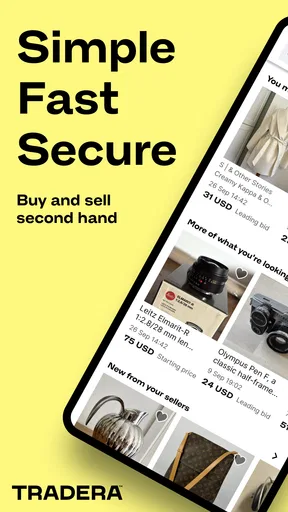
The user interface is clean and intuitive. It’s clear that the developers put a lot of thought into making the app user-friendly. From the moment you open it, you’re greeted with a sleek design that makes navigation a piece of cake. Tradera is developed by Tradera, and its shopping focus is clear: the app is meant to help people browse and trade second-hand goods rather than act like a catalogue for one retailer.
Browsing and Buying
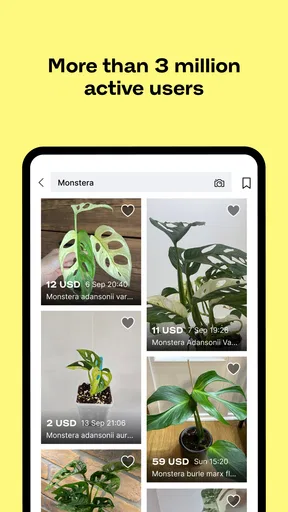
Diving into the buying side of things, I was pleasantly surprised by the variety of items available. Whether you’re looking for electronics, fashion, or even unique collectibles, Tradera has it all. The search functionality is robust, allowing you to filter results based on your preferences, which saves a ton of time.
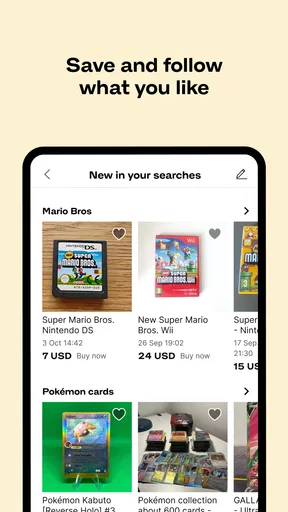
One feature I found particularly handy was the ability to save items to a wishlist. This means you can keep an eye on potential purchases without committing right away. Plus, the app sends notifications for price drops, so you never miss out on a good deal. The buying process itself is seamless, with multiple payment options that make transactions easy and secure.
My practical advice is to search with a clear idea of what matters most: the exact item, its condition, or a sensible spending limit. Then compare the listing details and photos rather than relying on a title alone. With used goods, two listings for what sounds like the same product may differ in wear, completeness, or presentation. Saving a promising item gives me room to think, but I still check whether the particular listing suits my needs before moving toward checkout.
Worth Reading Before You Choose

EA SPORTS FC Mobile 26 Is a Bigger Football Game, but It Takes Time

Flipboard Shows What News Apps Must Do Beyond the Feed

Switching to Android Auto Means Rethinking Your Driving Routine

Google Calendar Makes a Crowded Week Easier to Manage

Ludo King Makes the Most of the Minutes Between Plans

Baby Panda World Brings Quick Play to Modern Phones, but Its Game Library Feels Busy
For example, if I were replacing a household item, I would browse during a spare moment, save a few plausible options, and return later to compare them calmly. That is more useful than treating every notification as a reason to buy. A lower price is only a good deal if the item is the right one and the listing gives me enough confidence to proceed.
Selling Made Simple
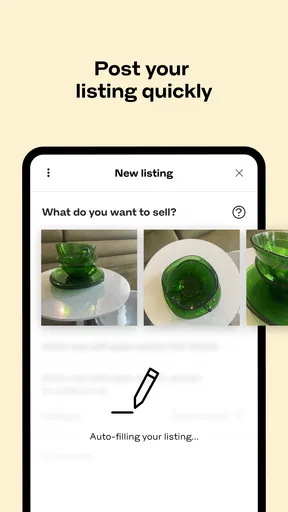
If you’re looking to declutter or make some extra cash, selling on Tradera is just as straightforward. Listing an item is quick and hassle-free. You simply snap a few photos, input details like description and price, and you’re good to go. I appreciated the tips provided by the app on how to make your listings more attractive to buyers.
The part that deserves a little care is preparing the listing before posting it. I would take clear photos from more than one angle, mention visible wear plainly, and make the description specific enough to answer obvious questions. That small effort can prevent avoidable back-and-forth later. For a box of mixed belongings, I would also decide what is worth listing individually and what is easier to keep together; the extra attention is most worthwhile for items someone is likely to search for by name or type.
Communication with potential buyers is facilitated through the app’s messaging system, so you can negotiate and finalize sales without needing to switch platforms. This integration makes the entire process feel more personal and less transactional.
That in-app conversation is a useful handoff between a listing and a completed sale: questions can be tied to the item, and I can keep the exchange in the same place as the advert. I would still be deliberate about what I promise. Before agreeing to a sale, make sure the description reflects the item as it is and that you can follow through on the practical arrangements. A quick reply is helpful, but clarity matters more than speed when a buyer is deciding.
Community and Support
One of the things that really stood out to me was the sense of community within the app. Users can leave ratings and reviews for sellers, which helps build trust and makes the buying process more transparent. I found this aspect very reassuring as both a buyer and a seller.
Ratings are a useful signal, not a substitute for checking the listing itself. I would consider the seller’s feedback alongside the photos, description, and how clearly they answer a question. That balanced approach is especially sensible for a purchase where condition matters more than it would for a standard new product. A buyer who wants a uniform, guaranteed retail experience may be happier with a conventional shop, while someone willing to assess individual second-hand listings has more reason to browse here.
Should you run into any issues, Tradera offers robust customer support. The help section is comprehensive, and their support team is responsive, which is always a plus in my book.
Who Will Get the Most from It
I think the app fits people who enjoy finding pre-owned goods, are comfortable comparing individual listings, or want to pass along usable items rather than leave them unused. Collectors and patient bargain hunters may appreciate having varied offers to browse, while occasional sellers can use it when clearing out a cupboard or making room after a move. The strongest use case is a specific search where you can wait for a suitable listing instead of needing an immediate replacement.
It is less compelling if you need a particular item today, want every product to arrive in identical condition, or dislike making a judgment from listing photos and descriptions. In those cases, a standard retailer or a local option with an in-person inspection may be a better fit. The choice is not simply between cheaper and more expensive: it is also between the variety of second-hand listings and the predictability of buying new.
For a realistic routine, I might browse while planning a weekend clear-out, save a few items I could use, and then photograph a lamp or jacket I no longer want. I would write the listing while the item is in front of me, so I can describe its condition accurately. If someone asks a question, I can answer in the app; once the item is sold, the exchange has moved from browsing to a direct conversation without needing a separate marketplace chat.
Costs, Compatibility, and Day-to-Day Fit
The app is free to download, and it is rated for Everyone. Its average rating is 4.6 from around 63,000 ratings, with more than a million installs. Those figures suggest it has found a broad audience, but they cannot tell me whether a particular seller or listing is a good match; I still treat each transaction as its own decision. Optional in-app purchases are listed in a range from $0.99 to $20.99 per item, so I would check any purchase prompt carefully and distinguish optional app purchases from the cost of an item being sold.
Tradera was released in 2011, and the current version is 3.185. On Android, it requires version 7.0 or later. Those details are useful if you are installing it on an older device, though the main question for most shoppers is whether the app runs comfortably on the phone they already use. I would keep notifications selective if frequent deal alerts distract me; saved items are more helpful when they support a considered search rather than create pressure to buy.
Compared with general classified marketplaces, the appeal here is having browsing, listing, messaging, and seller feedback in one shopping-focused app. Compared with a new-goods retailer, it asks more of me as a buyer: I need to inspect the description and make peace with the fact that second-hand items are not interchangeable. And compared with selling only to people nearby, an app-based listing can make it easier to manage interest from within one place, though it still takes time to prepare a clear advert and handle questions.
Where the Process Can Stall
The biggest friction is inherent to second-hand shopping. A search may show appealing options, but the best match depends on the details of each listing and on whether the seller’s information answers the questions that matter to me. If I am in a hurry, waiting and comparing can feel like work. If I am selling, taking useful photos and writing a careful description take longer than simply deciding to declutter.
I also would not treat a smooth interface as a guarantee that every transaction will be effortless. The app can keep the interaction together, but buyers and sellers still need to communicate clearly and make sensible choices. Before buying, I would read the full description and use the available conversation to resolve meaningful uncertainty. Before listing, I would avoid vague wording and make the item’s condition easy to understand. These habits make the marketplace more useful without pretending they remove every risk or inconvenience.
The app is free, but that does not make every purchase a bargain: the right comparison is the total value of the specific item, its condition, and the effort involved. When I do not need the item urgently, I can take time to compare. When I do, a predictable retailer may be worth choosing instead.
Final Thoughts
Overall, Tradera – buy & sell offers a fantastic platform for both buyers and sellers. Its user-friendly interface, wide range of functionalities, and supportive community make it a standout choice in the crowded online marketplace space. Whether you're looking to snag a great deal or find a new home for your items, this app is definitely worth checking out.
So, if you're on the hunt for a reliable and enjoyable way to buy and sell online, give it a try. You might just find your new favorite marketplace. I would go in with a clear idea of what I want, take time to judge each listing, and use the same care when describing anything I sell. That is where this app feels most rewarding: not as a shortcut around the judgment second-hand shopping requires, but as a convenient place to do that browsing and arranging.
Pros
- User-friendly interface with intuitive navigation.
- Secure payment methods for safe transactions.
- Diverse categories for a variety of products.
- Real-time notifications for bids and offers.
- Strong community with helpful reviews.
Cons
- Limited international shipping options.
- Occasional app crashes reported by users.
- Some listings lack detailed descriptions.
- Higher fees compared to some competitors.
- Inconsistent customer service responses.
FAQs for Tradera – buy & sell
What is Tradera, and how does it work?
Tradera is a user-friendly marketplace app that allows individuals to buy and sell a variety of items. Users can list products by uploading photos, setting prices, and providing descriptions. Buyers can browse categories or search for specific items. The app facilitates communication between buyers and sellers and supports secure payment options.
Is Tradera safe to use for buying and selling items?
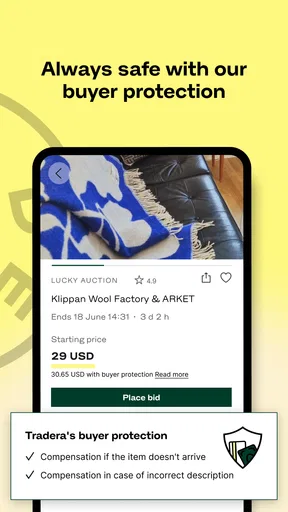
Yes, Tradera emphasizes user safety by implementing secure payment methods and offering a rating system for buyers and sellers. The app encourages users to review profiles before transactions and provides a built-in messaging feature to facilitate safer communication. Always exercise caution and follow safety guidelines when meeting in person.
Are there any fees associated with using Tradera?
While downloading Tradera is free, there might be fees for listing certain items or for using premium features that enhance visibility. Transaction fees may also apply depending on the payment method used. It's advisable to check the app’s terms of service for detailed information on any applicable charges.
What types of items can I buy or sell on Tradera?
Tradera hosts a wide array of categories, including electronics, fashion, home goods, and more. While most legal items can be traded, there are restrictions on prohibited items like weapons or hazardous materials. Users should review the app’s guidelines to ensure compliance with listing policies.
How does Tradera handle disputes between buyers and sellers?
Tradera provides a dispute resolution system aimed at resolving issues amicably. Users are encouraged to communicate through the app’s messaging feature to resolve misunderstandings. If issues persist, the support team can be contacted to mediate. Always keep transaction records to assist in any dispute resolution.


